The Internet protocol suite is the computer
networking model and set
of communications
protocols used on the Internet and similar computer networks. It is commonly known as TCP/IP, because it’s
most important protocols, the Transmission Control
Protocol (TCP) and the Internet Protocol (IP), were the first networking
protocols defined in this standard. Often also called the Internet model, it was
originally also known as the DoD model, because the development of the networking model was
funded by DARPA,
an agency of the United States
Department of Defense.
TCP/IP provides end-to-end connectivity
specifying how data should be packetized, addressed, transmitted, routed and received at the destination. This functionality is
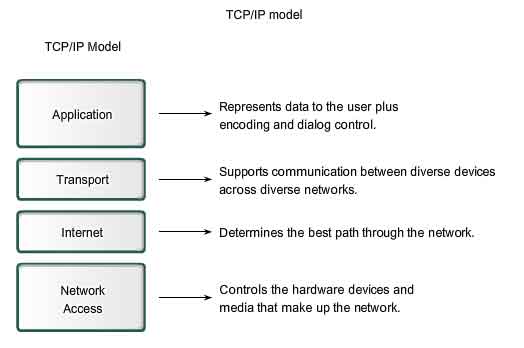
organized into four abstraction layers which are used to sort all related
protocols according to the scope of networking involved. From lowest to highest, the layers are
the link layer, containing communication
technologies for a single network segment (link); the internet layer, connecting hosts across
independent networks, thus establishing internetworking; the transport layer handling host-to-host communication;
and the application layer, which provides
process-to-process application data exchange.
The TCP/IP model and related protocol
models are maintained by the Internet Engineering
Task Force (IETF).
Key
architectural principles
An early architectural document, RFC 1122,
emphasizes architectural principles over layering.
- End-to-end
principle: This principle has evolved over time. Its original
expression put the maintenance of state and overall intelligence at the
edges, and assumed the Internet that connected the edges retained no state
and concentrated on speed and simplicity. Real-world needs for firewalls,
network address translators, web content caches and the like have forced
changes in this principle.
- Robustness
Principle: "In general, an implementation must be
conservative in its sending behavior, and liberal in its receiving
behavior. That is, it must be careful to send well-formed datagrams, but
must accept any datagram that it can interpret (e.g., not object to
technical errors where the meaning is still clear)." "The
second part of the principle is almost as important: software on other
hosts may contain deficiencies that make it unwise to exploit legal but
obscure protocol features."
Abstraction
layers
The Internet protocol suite uses encapsulation to provide
abstraction of protocols and services. Encapsulation is usually aligned with
the division of the protocol suite into layers of general functionality. In
general, an application (the highest level of the model) uses a set of
protocols to send its data down the layers, being further encapsulated at each
level.
The layers of the protocol suite near
the top are logically closer to the user application, while those near the
bottom are logically closer to the physical transmission of the data. Viewing
layers as providing or consuming a service is a method of abstraction to isolate
upper layer protocols from the details of transmitting bits over, for example, Ethernet and collision detection, while the lower layers
avoid having to know the details of each and every application and its
protocol.
Even when the layers are examined, the
assorted architectural documents—there is no single architectural model such as
ISO 7498, the Open Systems Interconnection (OSI) model—have
fewer and less rigidly defined layers than the OSI model, and thus provide an
easier fit for real-world protocols. One frequently referenced document, RFC 1958,
does not contain a stack of layers. The lack of emphasis on layering is a major
difference between the IETF and OSI approaches. It only refers to the existence
of the internetworking layer and generally to upper layers; this document was intended as a 1996
snapshot of the architecture: "The Internet and its architecture have
grown in evolutionary fashion from modest beginnings, rather than from a Grand
Plan. While this process of evolution is one of the main reasons for the
technology's success, it nevertheless seems useful to record a snapshot of the
current principles of the Internet architecture."
RFC 1122,
entitled Host
Requirements, is structured
in paragraphs referring to layers, but the document refers to many other
architectural principles not emphasizing layering. It loosely defines a
four-layer model, with the layers having names, not numbers, as follows:
- The
Application layer is the scope within which applications create user data
and communicate this data to other applications on another or the same
host. The applications, or processes, make use of the services provided by
the underlying, lower layers, especially the Transport Layer which
provides reliable or unreliable pipes to other processes. The communications partners are
characterized by the application architecture, such as the client-server
model and peer-to-peer networking.
This is the layer in which all higher level protocols, such as SMTP,FTP, SSH, HTTP,
operate. Processes are addressed via ports which essentially represent
services.
- The
Transport Layer performs host-to-host communications on either the same or
different hosts and on either the local network or remote networks separated
by routers. It provides a channel for the communication needs of
applications. UDP is the basic transport layer protocol, providing an
unreliable datagram service. The Transmission Control Protocol provides
flow-control, connection establishment, and reliable transmission of data.
- The
Internet layer has the task of exchanging datagrams across network
boundaries. It provides a uniform networking interface that hides the
actual topology (layout) of the underlying network connections. It is
therefore also referred to as the layer that establishes internetworking,
indeed, it defines and establishes the Internet. This layer defines the
addressing and routing structures used for the TCP/IP protocol suite. The
primary protocol in this scope is the Internet Protocol, which defines IP addresses. Its function in routing is
to transport datagrams to the next IP router that has the connectivity to
a network closer to the final data destination.
- The Link
layer defines the networking methods within the scope of the local network
link on which hosts communicate without intervening routers. This layer
includes the protocols used to describe the local network topology and the
interfaces needed to effect transmission of Internet layer datagrams to
next-neighbor hosts.
The Internet protocol suite and the
layered protocol stack design were in use before the OSI model
was established. Since then, the TCP/IP model has been compared with the OSI
model in books and classrooms, which often results in confusion because the two
models use different assumptions and goals, including the relative importance
of strict layering.
This abstraction also allows upper
layers to provide services that the lower layers do not provide. While the
original OSI model was extended to include connectionless services (OSIRM CL), IP is not designed to be reliable and
is a best effort delivery protocol. This
means that all transport layer implementations must choose whether or how to
provide reliability. UDP provides data integrity via a checksum but does not guarantee delivery; TCP provides both data
integrity and delivery guarantee by retransmitting until the receiver
acknowledges the reception of the packet.
This model lacks the formalism of the
OSI model and associated documents, but the IETF does not use a formal model
and does not consider this a limitation, as illustrated in the comment by David D. Clark, "We reject: kings,
presidents and voting. We believe in: rough consensus and running code."
Criticisms of this model, which have been made with respect to the OSI model,
often do not consider ISO's later extensions to that model.
For multiaccess links with their own
addressing systems (e.g. Ethernet) an address mapping protocol is needed. Such
protocols can be considered to be below IP but above the existing link system.
While the IETF does not use the terminology, this is a subnetwork dependent
convergence facility according to an extension to the OSI model, the internal
organization of the network layer (IONL).
ICMP & IGMP operate on top of IP
but do not transport data like UDP or TCP. Again, this functionality exists as
layer management extensions to the OSI model, in its Management Framework (OSIRM MF)
The SSL/TLS library operates above the
transport layer (uses TCP) but below application protocols. Again, there was no
intention, on the part of the designers of these protocols, to comply with OSI
architecture.
The link is treated like a black box.
The IETF explicitly does not intend to discuss transmission systems, which is a
less academic but practical
alternative to the OSI model.
The following is a description of each
layer in the TCP/IP networking model starting from the lowest level.
Link layer
The link layer has the networking scope of the local
network connection to which a host is attached. This regime is called the link in TCP/IP
literature. It is the lowest component layer of the Internet protocols, as
TCP/IP is designed to be hardware independent. As a result TCP/IP may be
implemented on top of virtually any hardware networking technology.
The link layer is used to move packets
between the Internet layer interfaces of two different hosts on the same link.
The processes of transmitting and receiving packets on a given link can be
controlled both in the software device driver for the network card, as well as on firmware or specialized chipsets. These perform data link functions such as adding a packet header to prepare it for transmission, then
actually transmit the frame over a physical medium. The TCP/IP model
includes specifications of translating the network addressing methods used in
the Internet Protocol to data link addressing, such as Media Access Control (MAC). All
other aspects below that level, however, are implicitly assumed to exist in the
link layer, but are not explicitly defined.
This is also the layer where packets
may be selected to be sent over a virtual private
network or other networking tunnel. In this
scenario, the link layer data may be considered application data which
traverses another instantiation of the IP stack for transmission or reception
over another IP connection. Such a connection, or virtual link, may be
established with a transport protocol or even an application scope protocol
that serves as a tunnel in the link
layer of the protocol stack. Thus, the TCP/IP model does not dictate a strict
hierarchical encapsulation sequence.
The TCP/IP model's link layer
corresponds to the Open Systems Interconnection (OSI) model physical and data
link layers, layers one and two of the OSI model.
Internet layer
The internet layer has the responsibility of sending
packets across potentially multiple networks. Internetworking requires sending data from the source
network to the destination network. This process is called routing.
The Internet Protocol performs two
basic functions:
- Host
addressing and identification: This is accomplished with a hierarchical IP addressing system.
- Packet
routing: This is the basic task of sending packets of data (datagrams)
from source to destination by forwarding them to the next network router
closer to the final destination.
The internet layer is not only agnostic
of data structures at the transport layer, but it also does not distinguish
between operation of the various transport layer protocols. IP carries data for
a variety of different upper layer protocols.
These protocols are each identified by a unique protocol number:
for example, Internet Control
Message Protocol (ICMP) and Internet
Group Management Protocol (IGMP) are protocols 1 and 2, respectively.
Some of the protocols carried by IP,
such as ICMP which is used to transmit diagnostic information, and IGMP which
is used to manage IP Multicast data, are layered on top of IP but
perform internetworking functions. This illustrates the differences in the
architecture of the TCP/IP stack of the Internet and the OSI model. The TCP/IP
model's internet layer corresponds to layer three of the Open Systems
Interconnection (OSI) model, where it is referred to as the network layer.
The internet layer provides only an
unreliable datagram transmission facility between hosts located on potentially
different IP networks by forwarding the transport layer datagrams to an
appropriate next-hop router for further relaying to its destination. With this
functionality, the internet layer makes possible internetworking, the interworking
of different IP networks, and it essentially establishes the Internet. The
Internet Protocol is the principal component of the internet layer, and it
defines two addressing systems to identify network hosts' computers, and to
locate them on the network. The original address system of the ARPANET and its successor, the Internet, is Internet
Protocol version 4 (IPv4). It uses a 32-bit IP address and is therefore capable of identifying
approximately four billion hosts. This limitation was eliminated by the
standardization of Internet
Protocol version 6 (IPv6) in 1998, and beginning production implementations
in approximately 2006.
Transport layer
The transport layer establishes a basic
data channel that an application uses in its task-specific data exchange. The
layer establishes process-to-process connectivity, meaning it provides
end-to-end services that are independent of the structure of user data and the
logistics of exchanging information for any particular specific purpose. Its
responsibility includes end-to-end message transfer independent of the
underlying network, along with error control, segmentation, flow control,
congestion control, and application addressing (port numbers). End-to-end
message transmission or connecting applications at the transport layer can be
categorized as either connection-oriented,
implemented in TCP, or connectionless, implemented in UDP.
For the purpose of providing
process-specific transmission channels for applications, the layer establishes
the concept of the port. This is a numbered logical construct
allocated specifically for each of the communication channels an application
needs. For many types of services, these port numbers have been
standardized so that client computers may address specific services of a server
computer without the involvement of service announcements or directory
services.
Because IP provides only a best effort delivery, some
transport layer protocols offer reliability. However, IP can run over a
reliable data link protocol such as the High-Level Data Link
Control (HDLC).
For example, the TCP is a
connection-oriented protocol that addresses numerous reliability issues in
providing a reliable byte stream:
- data
arrives in-order
- data has
minimal error (i.e., correctness)
- duplicate
data is discarded
- lost or
discarded packets are resent
- includes
traffic congestion control
The newer Stream
Control Transmission Protocol (SCTP) is also a reliable, connection-oriented transport
mechanism. It is message-stream-oriented—not byte-stream-oriented like TCP—and
provides multiple streams multiplexed over a single connection. It also
provides multi-homing support, in which a connection end can
be represented by multiple IP addresses (representing multiple physical interfaces),
such that if one fails, the connection is not interrupted. It was developed
initially for telephony applications (to transport SS7 over IP), but can also be used for
other applications.
The User Datagram Protocol is a
connectionless datagram protocol. Like IP, it is a best effort,
"unreliable" protocol. Reliability is addressed through error detection using a weak checksum algorithm. UDP is
typically used for applications such as streaming media (audio, video, Voice over IP etc.) where on-time arrival is more
important than reliability, or for simple query/response applications like DNS lookups, where the overhead of setting
up a reliable connection is disproportionately large. Real-time Transport
Protocol (RTP) is a
datagram protocol that is designed for real-time data such as streaming audio and video.
The applications at any given network
address are distinguished by their TCP or UDP port. By convention certain well known
ports are associated
with specific applications.
The TCP/IP model's transport or
host-to-host layer corresponds to the fourth layer in the Open Systems
Interconnection (OSI) model, also called the transport layer.
Application
layer
The application layer includes the protocols used by most
applications for providing user services or exchanging application data over
the network connections established by the lower level protocols, but this may
include some basic network support services, such as many routing protocols,
and host configuration protocols. Examples of application layer protocols
include the Hypertext Transfer
Protocol (HTTP), the File Transfer
Protocol (FTP), the Simple Mail Transfer
Protocol (SMTP), and the Dynamic Host
Configuration Protocol (DHCP). Data coded according to application layer
protocols are encapsulated into
transport layer protocol units (such as TCP or UDP messages), which in turn use lower layer protocols to effect
actual data transfer.
The IP model does not consider the
specifics of formatting and presenting data, and does not define additional
layers between the application and transport layers as in the OSI model
(presentation and session layers). Such functions are the realm of libraries and application
programming interfaces.
Application layer protocols generally
treat the transport layer (and lower) protocols as black boxes which provide a stable network
connection across which to communicate, although the applications are usually
aware of key qualities of the transport layer connection such as the end point
IP addresses and port numbers. Application layer protocols are often associated
with particular client–server applications, and common services have well-known port numbers
reserved by the Internet
Assigned Numbers Authority (IANA). For example, the HyperText Transfer
Protocol uses server
port 80 and Telnet uses server
port 23. Clients connecting to a
service usually use ephemeral ports, i.e., port numbers assigned
only for the duration of the transaction at random or from a specific range
configured in the application.
The transport layer and lower-level
layers are unconcerned with the specifics of application layer protocols.
Routers and switches do not typically examine the encapsulated traffic, rather
they just provide a conduit for it. However, some firewall and bandwidth throttling applications
must interpret application data. An example is the Resource Reservation
Protocol (RSVP). It is
also sometimes necessary fornetwork address
translator (NAT) traversal
to consider the application payload.
The application layer in the TCP/IP
model is often compared as equivalent to a combination of the fifth (Session),
sixth (Presentation), and the seventh (Application) layers of the Open Systems
Interconnection (OSI) model.
Furthermore, the TCP/IP reference model
distinguishes between user protocols and support
protocols. Support
protocols provide services to a system. User protocols are used for actual user
applications. For example, FTP is a user protocol and DNS is a system protocol.
Layer names and
number of layers in the literature
The following table shows various
networking models. The number of layers varies between three and seven.
|
RFC 1122,
Internet STD 3 (1989)
|
Cisco Academy
|
Kurose, Forouzan
|
Comer, Kozierok
|
Stallings
|
Tanenbaum
|
Mike Padlipsky's 1982 "Arpanet
Reference Model" (RFC 871)
|
|
|
Four
layers
|
Four
layers
|
Five
layers
|
Four+one
layers
|
Five
layers
|
Five
layers
|
Three
layers
|
Seven
layers
|
|
"Internet
model"
|
"Internet
model"
|
"Five-layer
Internet model" or "TCP/IP protocol suite"
|
"TCP/IP
5-layer reference model"
|
"TCP/IP
model"
|
"TCP/IP
5-layer reference model"
|
"Arpanet
reference model"
|
OSI
model
|
|
Application
|
Application
|
Application
|
Application
|
Application
|
Application
|
Application/Process
|
Application
|
|
Presentation
|
|
Session
|
|
Transport
|
Transport
|
Transport
|
Transport
|
Host-to-host
or transport
|
Transport
|
Host-to-host
|
Transport
|
|
Internet
|
Internetwork
|
Network
|
Internet
|
Internet
|
Internet
|
Network
|
|
Link
|
Network
interface
|
Data
link
|
Data
link (Network interface)
|
Network
access
|
Data
link
|
Network
interface
|
Data
link
|
|
(n/a)
|
|
Physical
|
(Hardware)
|
Physical
|
Physical
|
|
Physical
|
Some of the networking models are from
textbooks, which are secondary sources that may conflict with the intent of RFC 1122 and other IETF primary
sources.
Comparison of
TCP/IP and OSI layering
The three top layers in the OSI
model—the application layer, the presentation layer and the session layer—are not distinguished separately
in the TCP/IP model where it is just the application layer. While some pure OSI
protocol applications, such as X.400, also combined them, there is no
requirement that a TCP/IP protocol stack must impose monolithic architecture
above the transport layer. For example, the NFS application protocol runs over
the eXternal Data
Representation (XDR) presentation protocol, which, in turn, runs over a
protocol called Remote Procedure
Call (RPC). RPC
provides reliable record transmission, so it can safely use the best-effort UDP
transport.
Different authors have interpreted the
RFCs differently, about whether the link layer (and the TCP/IP model) covers
OSI model layer 1 (physical layer) issues, or
whether a hardware layer is assumed below the link layer.
Several authors have attempted to
incorporate the OSI model's layers 1 and 2 into the TCP/IP model, since these
are commonly referred to in modern standards (for example, by IEEE and ITU).
This often results in a model with five layers, where the link layer or network
access layer is split into the OSI model's layers 1 and 2.
The session layer roughly corresponds
to the Telnet virtual terminal functionality, which is part of text based protocols
such as the HTTP and SMTP TCP/IP model
application layer protocols. It also corresponds to TCP and UDP port numbering,
which is considered as part of the transport layer in the TCP/IP model. Some
functions that would have been performed by an OSI presentation layer are
realized at the Internet application layer using the MIME standard, which
is used in application layer protocols such as HTTP and SMTP.
The IETF protocol development effort is
not concerned with strict layering. Some of its protocols may not fit cleanly
into the OSI model, although RFCs sometimes refer to it and often use the old
OSI layer numbers. The IETF has repeatedly stated that Internet protocol and architecture
development is not intended to be OSI-compliant. RFC 3439,
addressing Internet architecture, contains a section entitled: "Layering
Considered Harmful".
Conflicts are apparent also in the
original OSI model, ISO 7498, when not considering the annexes to this model
(e.g., ISO 7498/4 Management Framework), or the ISO 8648 Internal Organization
of the Network layer (IONL). When the IONL and Management Framework documents
are considered, the ICMP and IGMP are neatly defined as layer management
protocols for the network layer. In like manner, the IONL provides a structure
for "subnetwork dependent convergence facilities" such as ARP and RARP.
IETF protocols can be encapsulated
recursively, as demonstrated by tunneling protocols such as Generic Routing
Encapsulation (GRE). GRE uses the same mechanism that OSI uses for
tunneling at the network layer.